Outreach that does not read like spam. Every send is checked before it goes.
Terry writes each email from your company's documents and from what Terry read about the person receiving it. You can review every draft before it goes out. Terry reads every reply and hands the warm replies to your reps or referral partners.
Terry also works in Claude. You ask in plain words from claude.ai or the Claude app, and Terry does the work as you, through the same checks as the dashboard. See how
- Gmail
- Microsoft 365
- SMTP
- Google Calendar
- HubSpot
- Salesforce
- Google contacts
- Outlook contacts
- Twilio
- Zoom
- Webhooks
A few plain numbers.
First emails written from your own documents
Terry writes each first email from your documents and from the person's public pages, and Terry keeps the page each fact came from.
Terry reads every reply
An easy question gets a drafted answer for your approval. A warm reply goes to a rep.
The prospect picks the meeting time
The prospect picks an open time from your calendar, and the calendar invite carries a short brief on that person for the rep.
- checks on every message: consent, sender identity, footer and unsubscribe
- 4
checks on every message: consent, sender identity, footer and unsubscribe
- tools Terry connects to, from Gmail to HubSpot
- 12
tools Terry connects to, from Gmail to HubSpot
- add-ons to switch on when you need them
- 20
add-ons to switch on when you need them
- business days to finish setup once we have your documents
- 2
business days to finish setup once we have your documents
One Terry instead of a stack of tools.
Start with one product and add another when you need it. Every message, call and text passes the same checks.
Sales
Find people who fit, write from your own documents, and book the time.
- Terry researches each person and scores the fit before you write.
- Flows run across email, LinkedIn and texts.
- Terry reads every reply and hands the warm replies to a rep.
Creator
Answer everyone who messages you on Instagram, WhatsApp or Telegram from one place.
- Terry drafts each answer, and you approve it.
- Messages from every app arrive in one place.
- The same rules check every reply.
Campaigns
BetaSend specials, events and news to customers who signed up for them.
- Terry sends one text or email, once or every week.
- Terry keeps an opt in record for every contact.
- Every email carries an unsubscribe, and every text accepts STOP.
Receptionist
BetaTerry picks up when someone calls your business number.
- Terry says it is an AI first, on every call.
- Terry takes the caller's need and ZIP code.
- Terry texts a booking link to callers who say yes.
Our team sets Terry up, you review the drafts, and your reps take the warm replies.
- 01
Our team sets Terry up
You tell us who you sell to. We connect your mailboxes, calendar and CRM, load your documents and email you the link to sign in.
- 02
Draw the flow, try it on one person, then publish it
You lay the campaign out as a flow of steps. Step through shows what one person will get, box by box, before anyone is enrolled. Terry sends inside the hours you set, and you can pause that flow at any time.
- 03
Your reps get the people who answered
Terry reads every reply and drafts answers to the easy questions. Warm replies can be shared fairly across your reps or partners in turn, or go to the rep for that territory. That rep is copied when the person says yes, and a hand off email introduces the rep to the person who replied.
Terry is not a template with AI on top. Every message starts from your company.
Terry writes with ContextBus plugged in. ContextBus is the context engine behind Terry, and every draft starts from your approved documents and the rules you set, never from a blank model.
- A generic model knows only what someone pastes into the prompt.
- A generic model writes from a prompt, not from research on the person.
- A generic model can invent a figure, a name or a promise.
- Terry starts from your documents and your rules.
- Terry writes to one person, from what Terry read about that person.
- Terry holds a reply that names a number, name, date or link it was never given, so a person can check it.
What happens before a message goes out
- 01
Your knowledge goes in
Your admin loads your documents and playbooks into ContextBus. Pages read from your website wait for your review, so an email is written only from pages someone approved.
- 02
Your rules ride along
Your do and don't rules sit at the top of every draft and every reply. If Terry cannot read those rules, Terry holds the draft for a person.
- 03
Only what fits this person
For each person Terry pulls the parts of your approved knowledge that fit them, plus what it read on their public pages and their company's own website, each fact with the page it came from. Knowledge that has earned replies ranks higher.
- 04
Checked before it goes
A policy check holds savings claims, guarantees and any line claiming to be human. A grounding check holds a reply that names a number, name, date or link Terry was never given, and a beta runs that same check on first emails. Every message must pass the consent, sender, footer and unsubscribe checks before it sends.
- 05
Your edits teach Terry
Every edit, approval and rejection becomes a test case. ContextBus suggests rule and knowledge changes from those cases, and nothing changes until you approve the change.
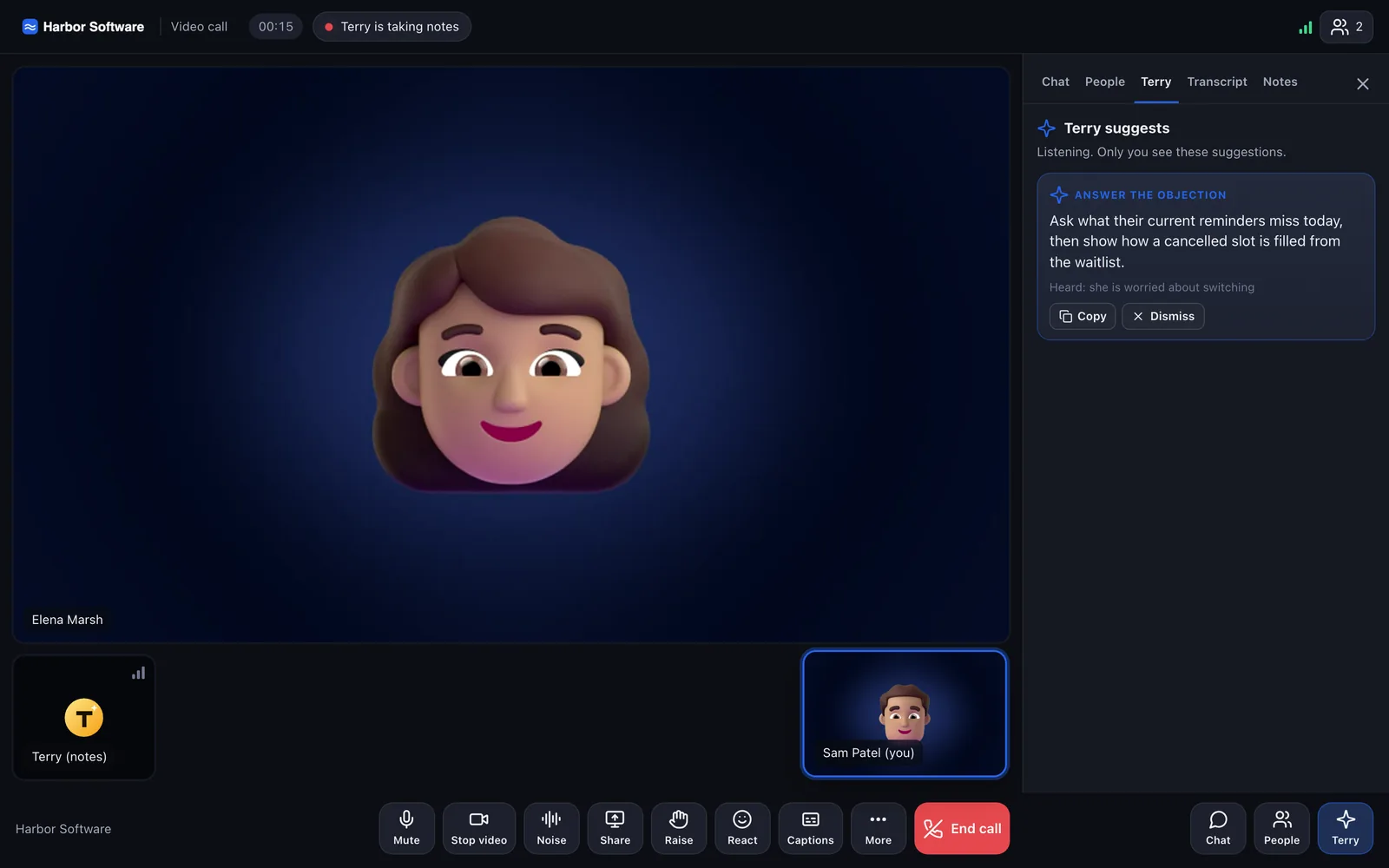
Terry takes notes in the meeting and answers your business line.
On a Terry video call, Terry takes notes once every guest agrees. On your business line, Terry picks up every call and hands it to a person on request or in an emergency.
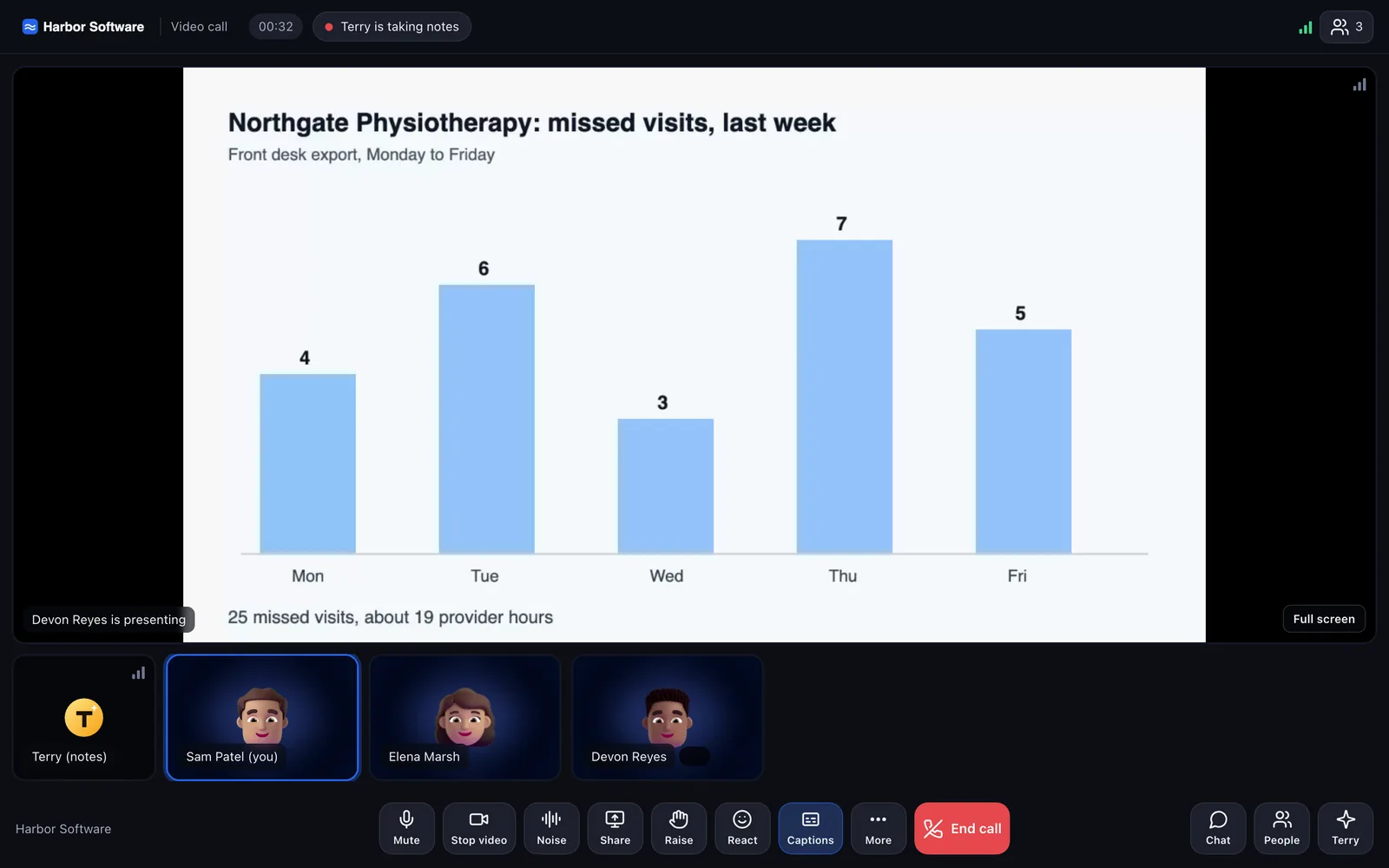
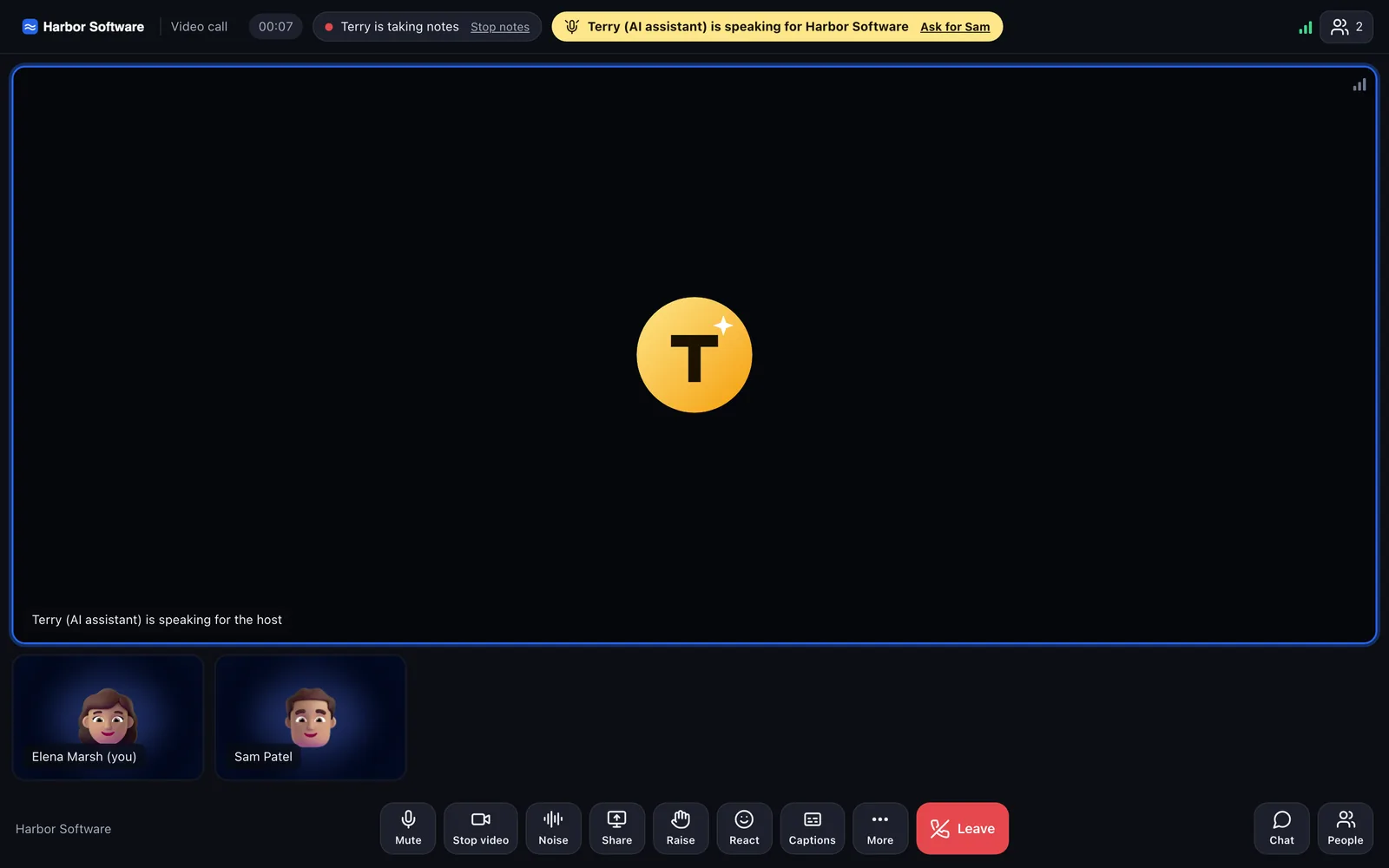
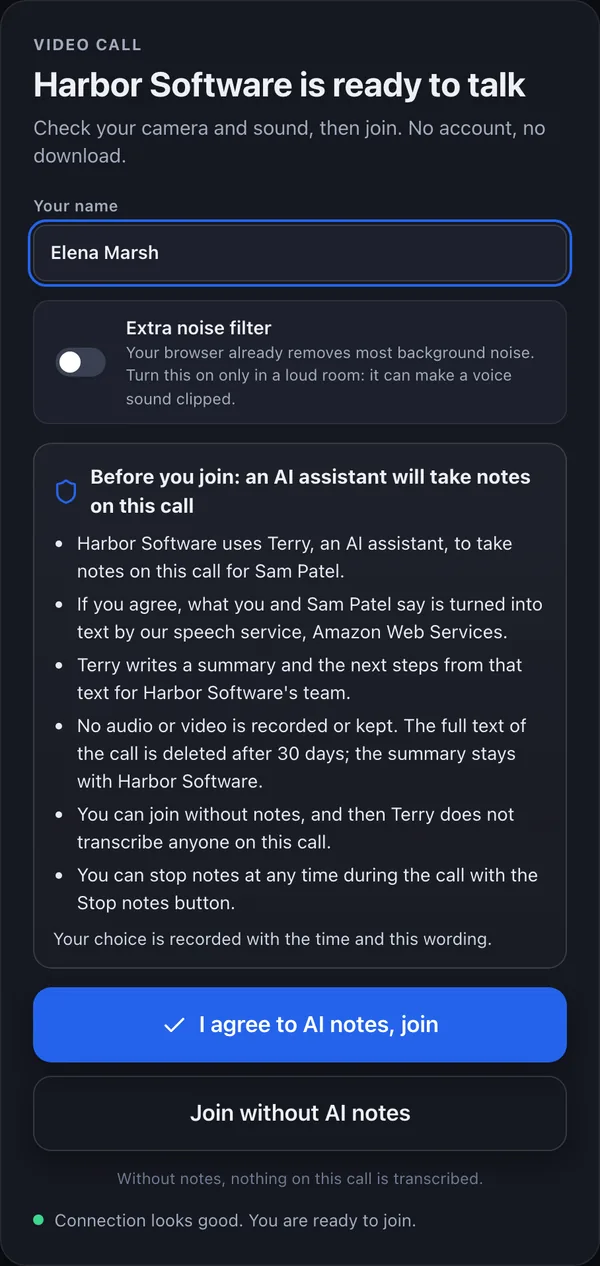
- Before anything is transcribed
Each guest chooses: agree to AI notes, or join without them.
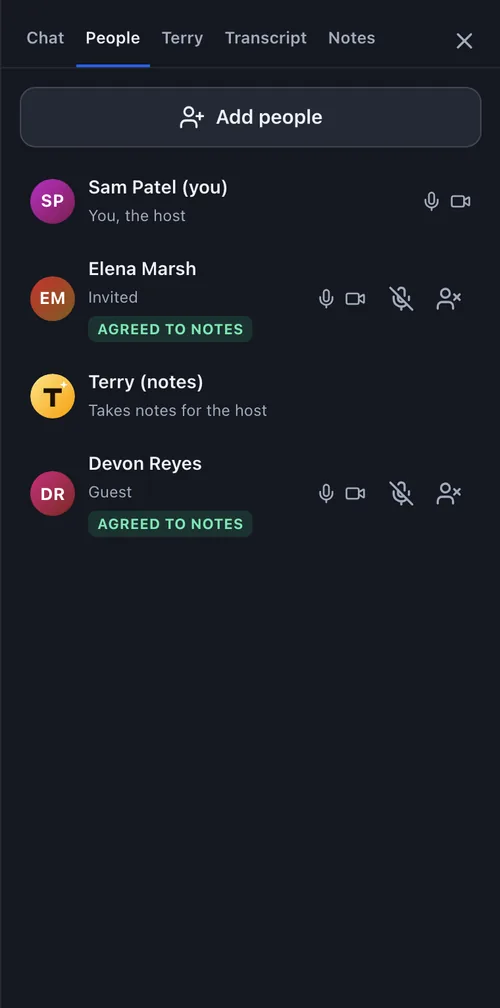
- Who agreed
The host sees each guest's answer.
- After the call
The host gets Terry's notes, and a follow up email waits in Review.
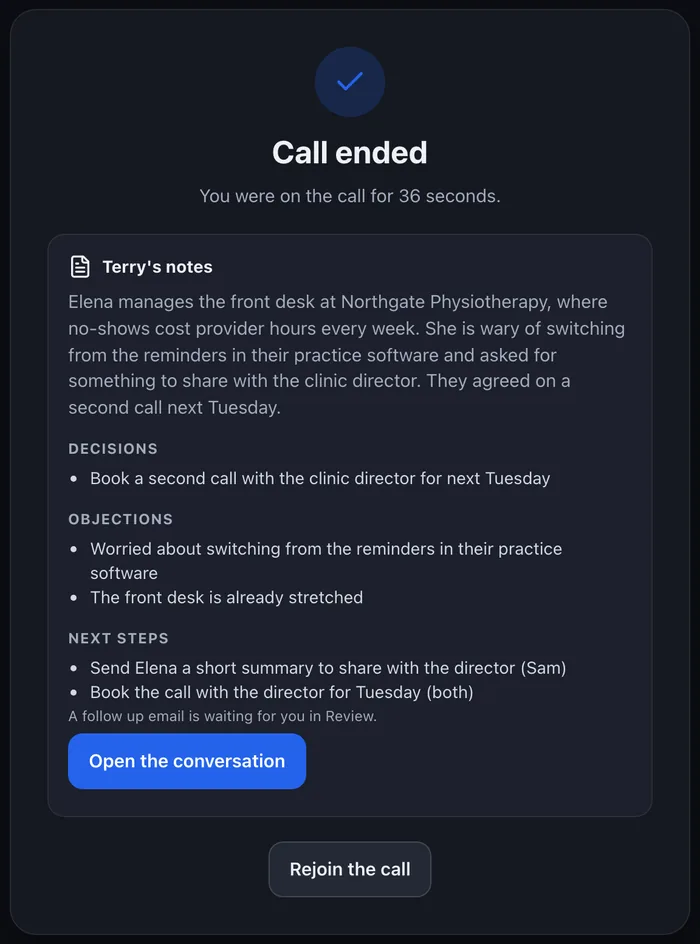
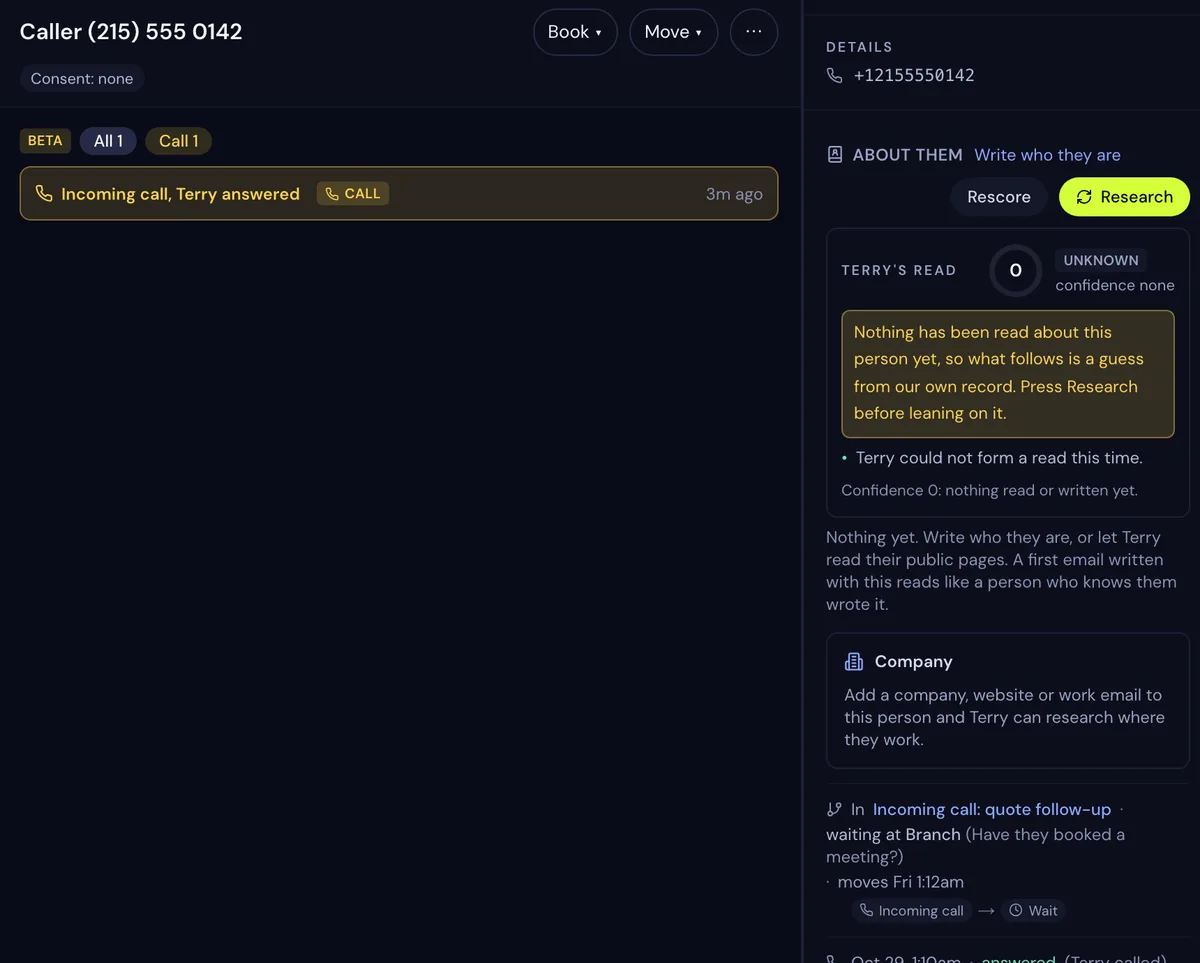
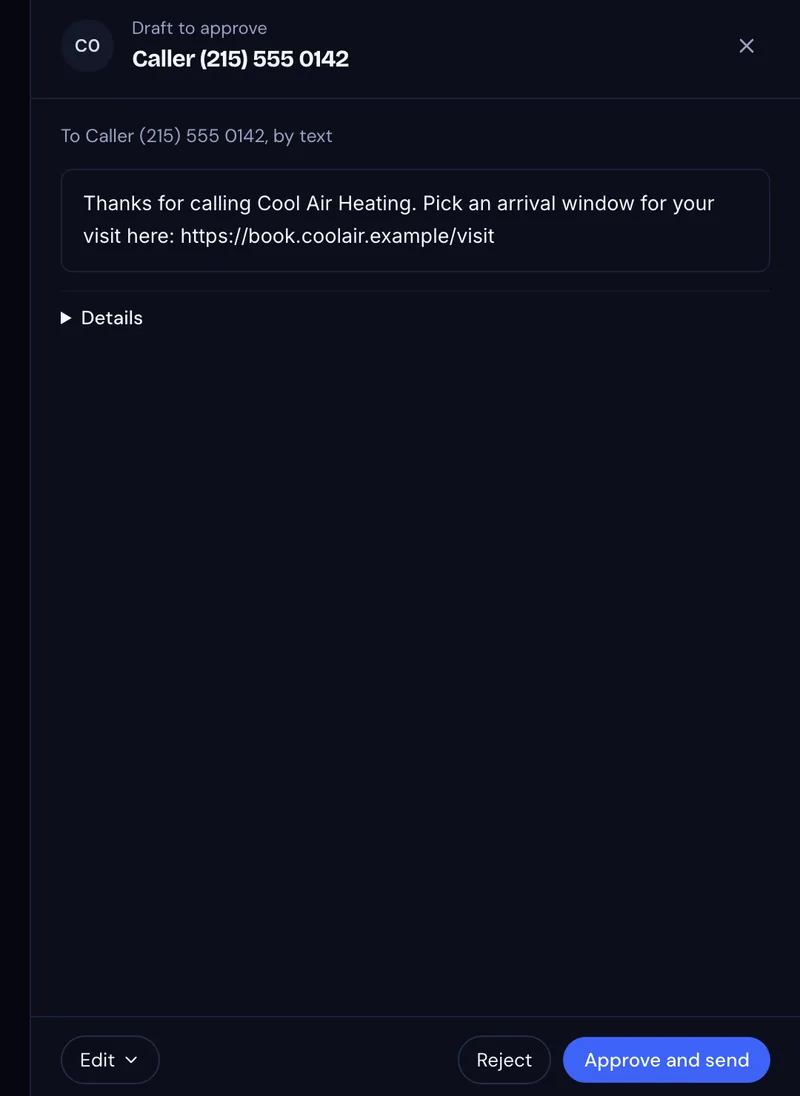
Real screens from test calls. The people and businesses are fictional.
Terry in your calls
BetaTerry joins a Terry call as the note taker once every guest agrees, and the rep gets the notes and a follow up draft to review.
Let Terry take the call
BetaA rep can hand the conversation to Terry. Terry waits until everyone in the room agrees, and the first thing Terry says is that it is an AI.
Terry answers the phone
BetaTerry picks up when someone calls your business number. Terry says it is an AI, takes the caller's need and ZIP code, and texts a booking link to callers who say yes.
Group calls
BetaInvite colleagues and guests to one Terry call with an emailed link.
Terry researches, writes, reads replies and books meetings, and checks every send.
CAN-SPAM checks on every email
Terry checks the sender's identity, your postal address in the footer and a one-click unsubscribe on every message. An opt-out is honoured the same minute, and Terry checks your domain's SPF, DKIM and DMARC records.
Flows you can see before anything sends
A flow lays a campaign out as steps, such as an email, a wait, a branch on the reply, a text and a call. Terry checks every flow before it goes live, step through shows what one person will get, and you can pause the flow at any time.
Your documents and rules in every draft
Your documents and your do and don't rules live in ContextBus, the context engine behind Terry, and they shape every message. A grounding check holds a reply that names a number, name, date or link Terry was never given.
Replies sorted and sent to the right rep
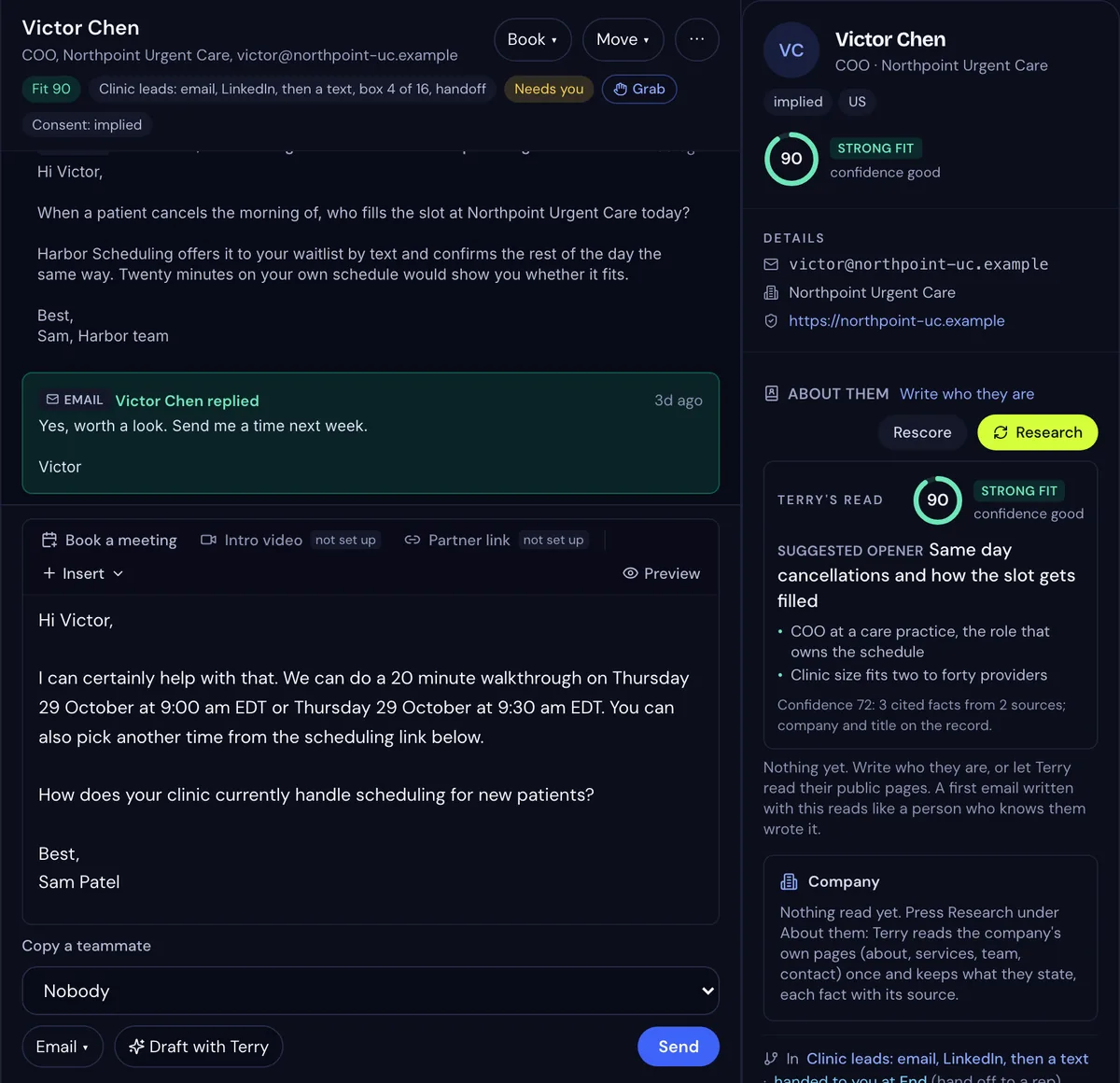
The Inbox keeps every reply in one thread per person, with a filter for each flow. A yes gets the booking link with the rep who owns the conversation copied, a question gets a drafted answer for your approval, and a no gets a polite close. Each rep also gets one email a day listing the replies and yeses on their conversations.
Offer times, and book the one the prospect picks
A booking page shows the open times on your Google or Microsoft 365 calendar, and bookings can be shared fairly across your reps in turn, so the rep with the fewest recent meetings takes the next one. The calendar invite carries a short brief on the person for the rep.
From your own address, under a daily cap
Terry sends from your own Gmail or Microsoft 365. Each mailbox has a daily cap, a new mailbox starts small and climbs, sends are spread across the working day, and follow ups stay in the first email's thread. Replies to people who wrote back never count against your daily sends, and Terry never caps a conversation. If bounces or complaints climb, Terry pauses that mailbox and tells you. For more volume, warmed pool mailboxes on a separate domain carry the cold sends.
Work your pipeline from Claude.
Connect Claude to Terry and ask in plain words. Claude acts as you, with your role, and every action passes the same checks as a click in the dashboard.
- Claude can tell you what needs you today, your meetings and your LinkedIn to do list.
- Claude can research a company and score how well a person fits.
- Claude can import a list with the consent basis you state.
- Claude can read a thread and draft a reply that waits in Review.
- Claude can build a flow, check it, and show who would be refused before anyone is enrolled.
- Claude sends only after you have seen the exact words and said send.
The connector works in claude.ai, the Claude desktop app and Claude on your phone, on Pro and above.
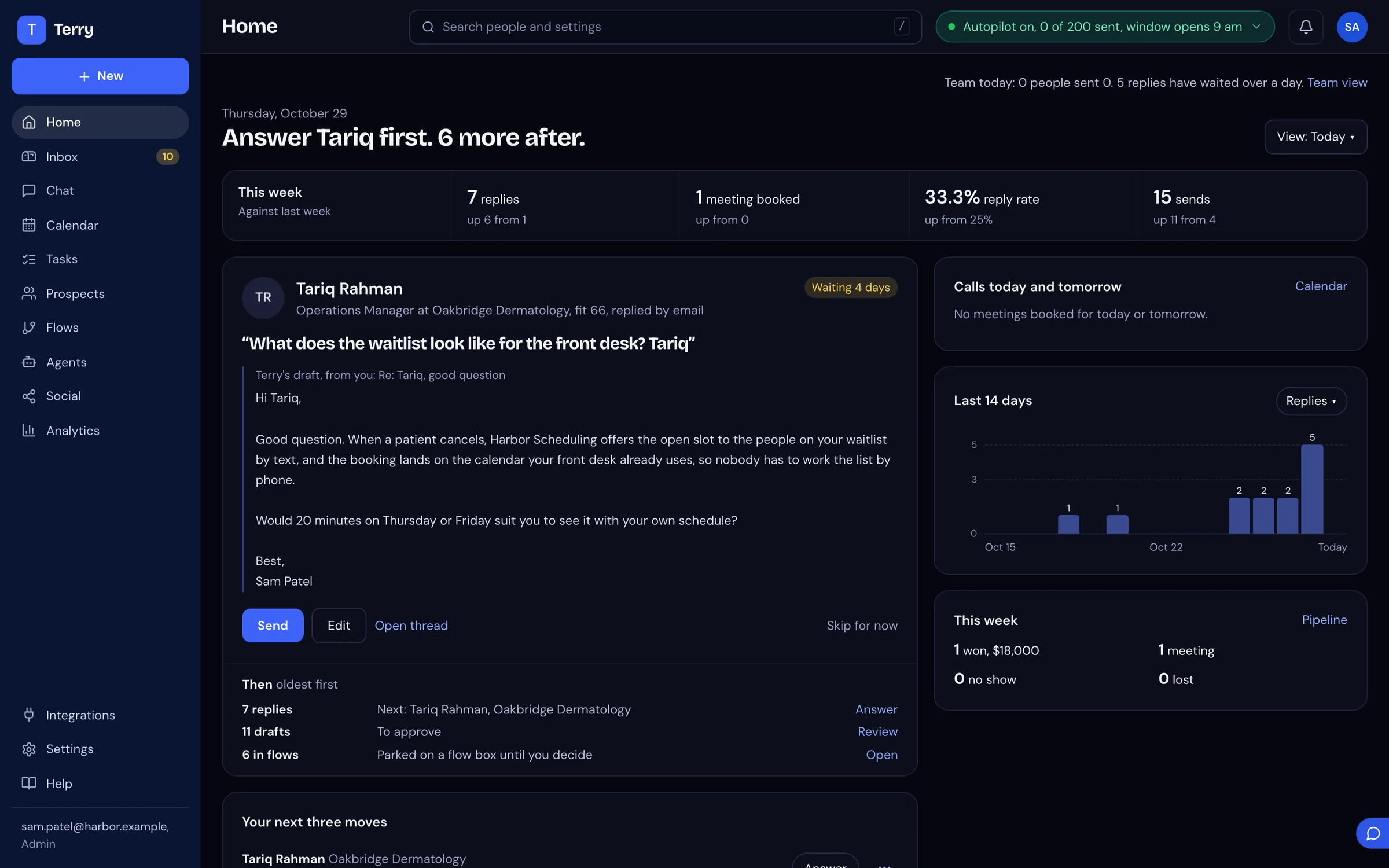
Home, Inbox, Compose and Flows sit in one workspace.
These are the real screens, from a demonstration workspace with fictional people in it.
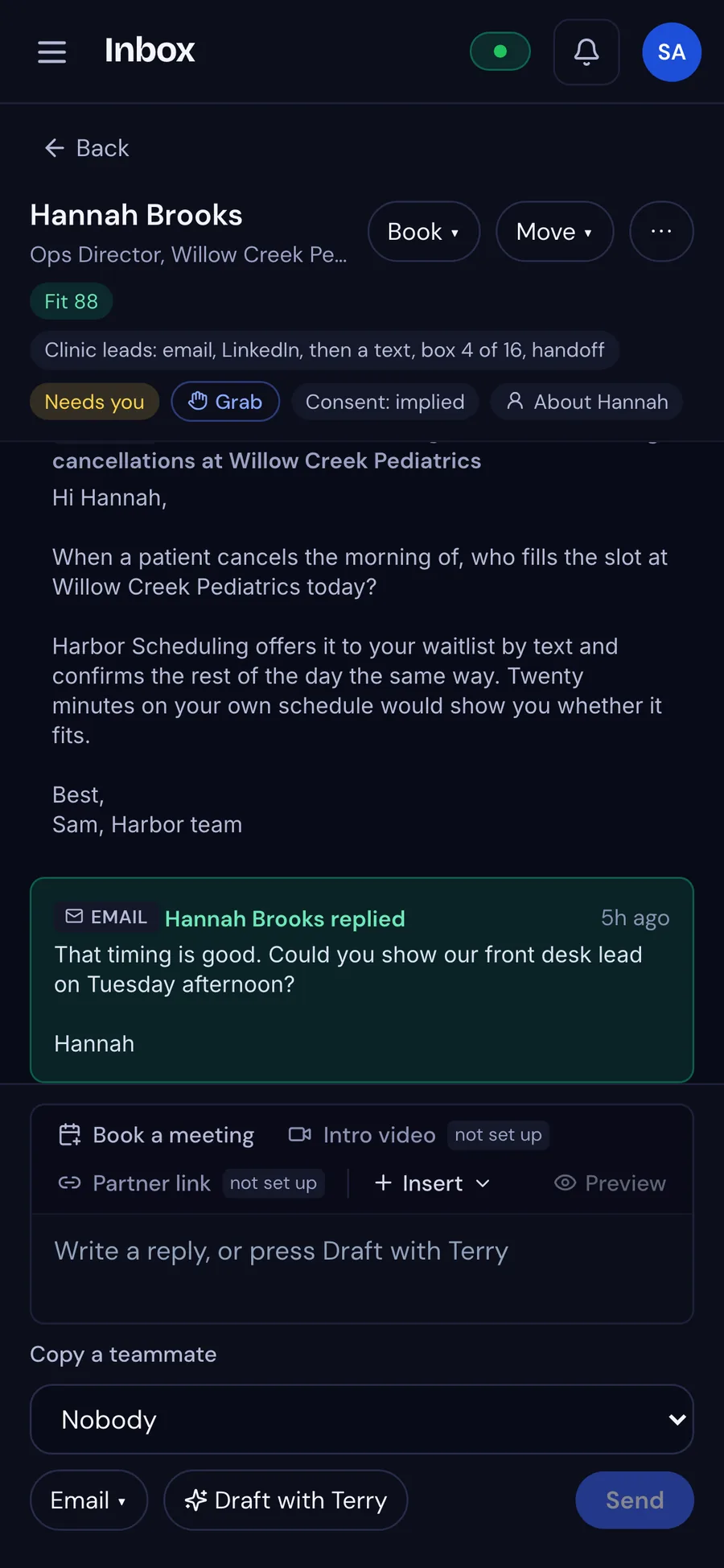
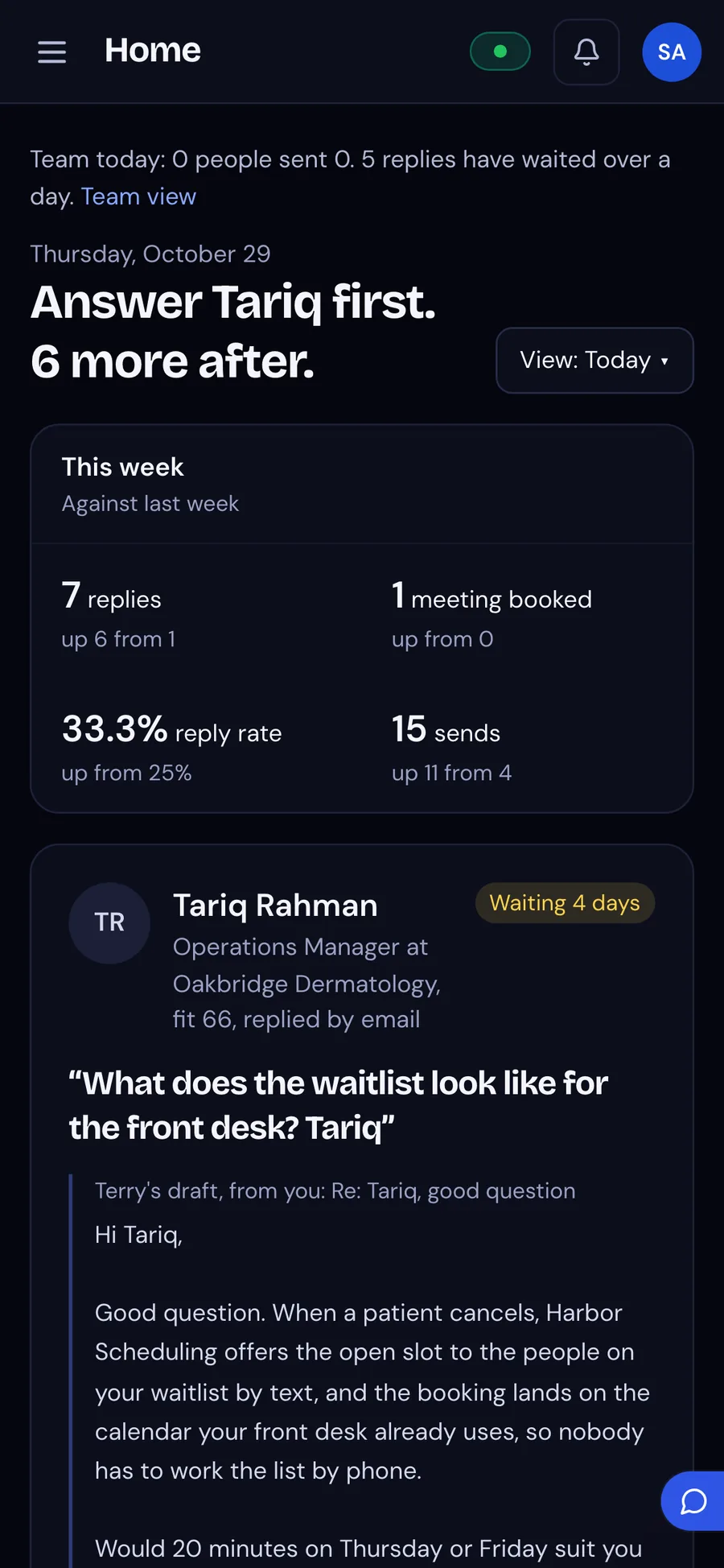
Terry also works on your phone.
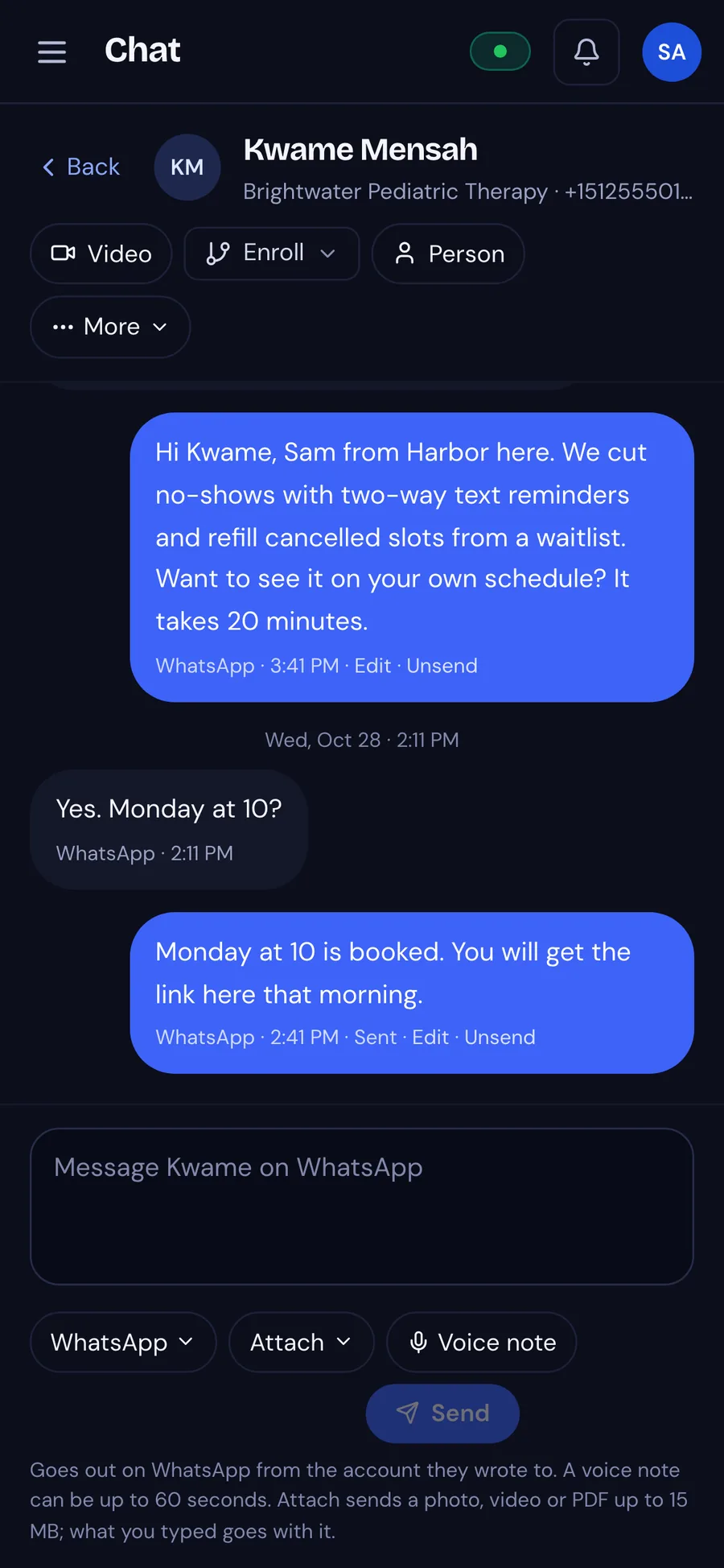
A rep can open the same Inbox and Chat on a phone and answer a warm reply the day it arrives.
 Home
- Inbox
 Chat
See what will be sent before it goes to a list.
The flow you drew in step two holds emails, waits, a branch on the reply, a text or a call, and a hand-off to a rep. When someone changes a step, everyone on the team sees the change.

Start from a ready-made flow
Pick a starter or draw from blank. Every step is a box you can move.
Checked before it goes live
Terry checks the flow before it goes live, and a flow with an error cannot be published until the error is fixed.
Try it on one person first
Step through shows exactly what one prospect will get, box by box, before you press publish. You can pause a live flow at any time.
Add a channel when you need it, and pay only while it is connected.
- LinkedIn
Terry sends LinkedIn outreach, or gives a rep the task to do by hand.
- Texting
Terry texts people who replied or opted in.
- Calling
Terry places scripted calls, and an incoming call rings your rep's phone.
- CRM sync
Terry writes outcomes back to HubSpot or Salesforce.
- Contact feeds
Terry brings people in from your CRM or your contacts and keeps them in sync.
- Find leads
One search finds companies and people, and lookalikes of your best fits.
- Company research
Terry reads each company from its own website and keeps the page each fact came from.
- Terry's read on each person
Terry scores every person on a list you drop in, and says how sure Terry is and why.
- Territories
Territories send each person to the team and mailboxes for their state.
- Events
Webhooks send events to your systems and bring events from them into Terry.
- Advanced analytics
Advanced analytics adds AI use by model, team productivity, where your leads came from and messages by status.
- Rep hand-offs
Hand to me moves a warm conversation into the rep's own mailbox with one introduction.
- Chat
The Chat tab shows the texts, calls and video with each person as one conversation.
- WhatsApp, Instagram, Telegram
Terry drafts an answer for everyone who messages your WhatsApp, Instagram or Telegram accounts.
- Instant videoBeta
A rep can start a video call straight from a conversation.
- Group callsBeta
A rep can invite colleagues and guests by email to one Terry call.
- Terry in your callsBeta
Terry takes notes and drafts a follow up, once every guest agrees.
- Terry answers the phoneBeta
Terry answers your business line, takes the caller's need and ZIP code, and texts a booking link to a caller who says yes.
- BroadcastsBeta
Terry sends one text or email, once or every week, to people who signed up for those messages.
- Copy a teammateBeta
A manager can be copied on a member's outreach until a date you set.
See what Terry costs before you talk to anyone.
Pick a lane, add only what you use, and watch the month add up.
Starter
For a founder or a pair getting started
$99/mo- 2 seats, each sending from their own Gmail or Microsoft 365, warm or cold
- No extra domain to buy and nothing to warm up. For more volume, Pro adds sending mailboxes
- 3,000 AI credits a month
- Send checks, flows, knowledge and rules, the Inbox, booking, CRM sync
- Set up by our team
Pro
For firms with a few reps or referral partners
$349/mo- 5 seats included, up to 10 at $25 each
- Sending setup included, switched on when you need it (2 domains, 6 mailboxes, about 180 a day)
- More sending: the $29 growth pack, 1 domain, 3 mailboxes, about 90 more a day
- 10,000 AI credits a month
- CRM sync, find leads, contact feeds, territories, analytics
- Every add-on available
Enterprise
For a company with its own requirements, on its own contract
Contact us- Unlimited seats
- A dedicated environment
- Per-member analytics and audit export
- Custom limits and a contract
- Support with a response time
What Terry checks, what Terry costs and what Terry will not do.
What does Terry check, and what is left to me?
Every email passes the same checks before it leaves: the sender's identity, your postal address in the footer and a one-click unsubscribe, which are the CAN-SPAM basics. Opt-outs are honoured the same minute, and any person can be exported or erased on request. A first email that claims you spoke before is held for a person. Terry applies the rules you set and keeps a record of what it checked. Where your list came from and what your offer says stay with you. Terry is not a law firm, this is not legal advice, and responsibility for your own compliance stays with you.
Will it sound like AI?
Terry writes from your documents, your do and don't rules and what Terry read on the person's public pages. A check holds a reply that names a number, name, date or link Terry was never given. Asked directly, Terry says it is an AI. You can review every draft before it goes out.
Will this hurt my main domain?
Terry paces every mailbox. Each one has a daily cap, a new one starts small and climbs, sends are spread across the working day, and follow ups stay in one thread. If bounces or complaints climb, Terry pauses that mailbox and tells you. For volume, or to keep cold mail off your main domain, pool mailboxes on a separate domain carry the cold sends. No tool can promise that every email reaches the inbox, so we do not promise it either.
What happens when someone replies?
Terry reads the reply. A yes gets the booking link, with the rep who owns the conversation copied. A question gets a drafted answer for a person to approve. A no gets a polite close. Replies can be shared fairly across your reps in turn, and a rep can grab any conversation or take that conversation into the rep's own mailbox.
Can I stop a flow once it starts?
Yes, an admin can pause a flow at any time and resume it later. A flow never sends its next message over a reply nobody has answered, and before the flow goes live, step through shows what one person will get.
Which AI writes the emails?
Terry writes with a model our team supplies and manages. In beta, a workspace can bring its own Anthropic key instead. That key then runs every model call Terry makes to write or read, Ask Terry included, while the search index for your documents, call transcription and Terry's voice stay on our account. Terry still counts every call in credits, and credits beyond the plan bill at a lower platform rate. A new model must pass a writing test before it may draft, and each person has a monthly AI allowance that an admin can change.
How fast are we live, and how much can we send on day one?
Your workspace is live the same business day. We finish setup within two business days of receiving your documents and mailboxes, and outreach starts when you approve the first sends, usually day three. Sending starts slowly and grows. A brand new mailbox starts at a few emails a day and reaches its full daily cap over about eight weeks, and a mailbox you have used for years can skip that ramp. Warmed mailboxes from us are ready in about two days; a fresh domain of your own takes two to four weeks.
Do I need extra mailboxes?
You do not need them for light outreach. Each seat sends from the person's own Gmail or Microsoft 365, and Terry paces that mailbox under its daily cap. Pool mailboxes on a sister domain are for volume, or for keeping cold mail off your primary domain. Pro includes a sending setup (2 domains, 6 mailboxes, about 180 a day), switched on when you need it. When you need more volume, add a growth pack: $29 a month for 1 domain, 3 mailboxes, about 90 more a day.
Why do the sending bundle and growth packs come with their own domains?
Cold email at volume goes out from separate domains that look like yours, such as a sister of your main domain, so your main domain and the mailboxes your team uses every day stay out of cold sending. Our team buys those domains and sets them up for you, and Terry warms each new mailbox slowly: it starts at a few emails a day and reaches its full daily cap over about eight weeks. The price of each domain is inside the bundle or the pack, not a separate charge. Some tools offer unlimited accounts, which means you buy and connect the domains yourself. Starter sends from your team's own mailboxes under a daily cap, Pro includes one sending setup (2 domains, 6 mailboxes, about 180 a day), growth packs add more up to 4, and past that we plan more domains with you.
What will Terry not do?
Terry will not claim to be a person, and asked directly, Terry says it is an AI. Terry will not write to anyone who opted out. Terry holds a first email that pretends you have spoken before, so a person can rewrite it. We do not promise a number of meetings or a reply rate, because those depend on your list and your offer. What Terry does promise is the same checks on every send.
Where does my data live?
Your data stays private to your workspace, and it stays yours. Our team runs and secures Terry, and if you ask, we will walk you through how your data is kept.
Our team sets Terry up. You approve the first sends.
You tell us who you sell to and which mailboxes you use. We connect those mailboxes, your calendar and your CRM, load your documents, and nothing goes out until you have approved those first emails.
Every email carries your postal address and a one-click unsubscribe, which are the CAN-SPAM basics, and every email leaves inside your send hours and daily caps. Terry is powered by ContextBus, the context engine behind every draft.